1 Introduction
Adding a Service Reference allows you to generate a proxy class which will allow you to communicate with a web service. The proxy class is generated using Web Service Description Language (WSDL). The WSDL describes what service methods are available and how to communicate with the service methods.
How to Start
To begin using TPN web service, firstly you will require access to be able to communicate with our web services. To get access contact our helpdesk@tpn.co.za
2 Add Service Reference on Visual Studio
2.1 To New Project
- Open Visual Studio
- Click "File" menu, select "New" on the menu dropdown and then click "Project"
- Under "Templates", select "Console Application" and then rename project to your preferred name and select your preferred location.
-
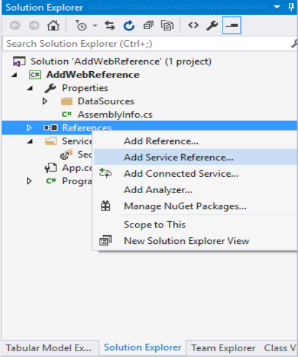
Once project is created, go to "Solution Explorer" pane, right click and select "Add Service
Reference"
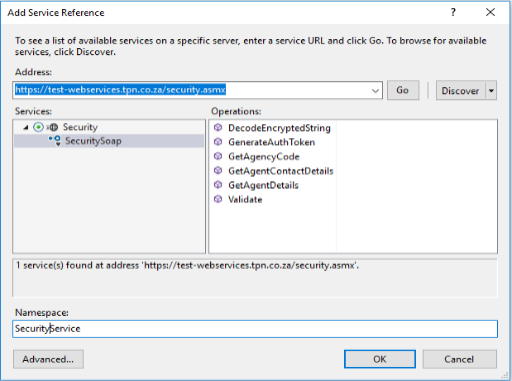
- In the "Add Service Reference" dialog box, input the URL of the web service and then click "Go"
- Update Namespace to a preferred name or use names in the web service documentation
-
Click "Ok" to add service reference
2.2 To an Existing Project
- Open an existing Visual Studio Project
-
Once project is created, go to "Solution Explorer" pane, right click and select "Add Service
Reference"
- In the "Add Service Reference" dialog box, input the URL of the web service and then click "Go"
- Update Namespace to a preferred name or use names in the web service documentation
-
Click "Ok" to add service reference