1 Introduction
Adding a Service Reference allows you to generate a proxy class which will allow you to communicate with a web service. The proxy class is generated using Web Service Description Language (WSDL). The WSDL describes what service methods are available and how to communicate with the service methods.
How to Start
To begin using TPN web service, firstly you will require access to be able to communicate with our web services. To get access contact our helpdesk@tpn.co.za
2 Add Service Reference on Visual Studio to a .Net Core application
- Open Visual Studio
-
Right Click "Connected Service" under your Project
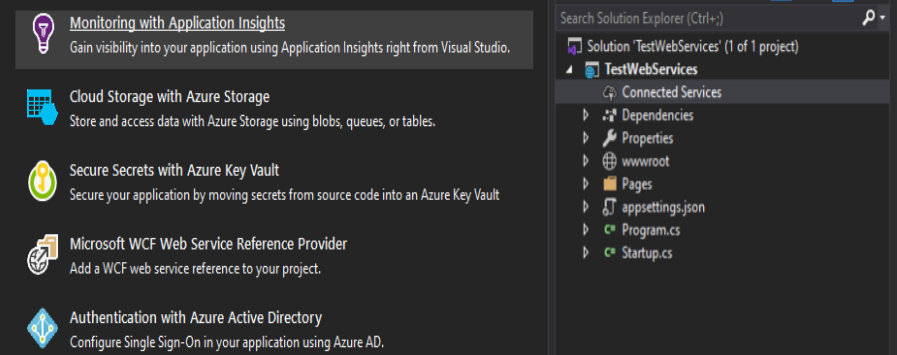
- Click "Microsft WCF Web Service Reference Provider", to add a WCF web service reference to your project.
-
On "Service Endpoint" tab, enter WCF web service url. For example the "Security Web Service" url: https://test-webservices.tpn.co.za/security.asmx.
Change the "Namespace" to a relevant name describing the service. Click "Next" button.
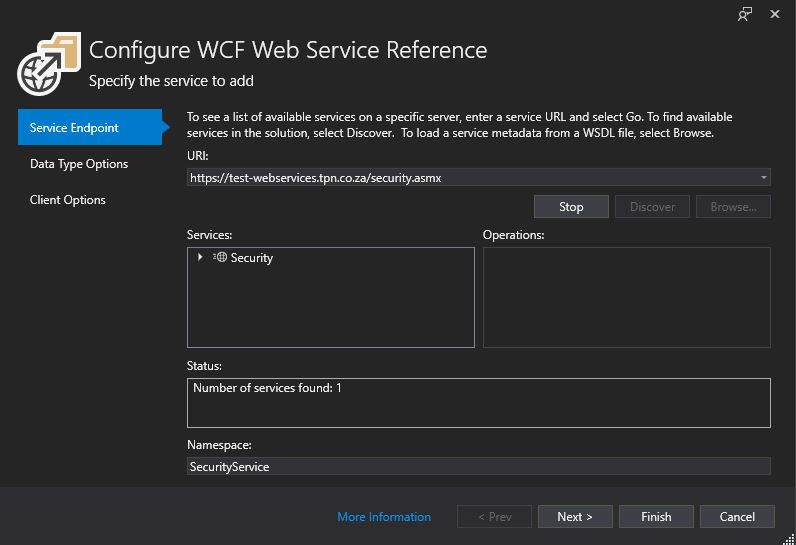
- In the "Data Type Options" tab, leave deafault values. Select "Reuse types in refenced assemblies" and "Reuse types in all referenced assemblies", to ensure exiting data types donot clash with datatype from the WCF web service.
- Click "Finish" button.